SECURE. ORGANIZED. ALWAYS AHEAD.

Digital Office Management
for Diplomatic Missions
and International Offices

Automatic email routing • Contact intelligence • Workflow automation • Staff-assisting office tools

DiplomaticOne automatically handles routine workflow and intelligently assists diplomatic staff, helping offices stay connected and preserve institutional knowledge — while people remain in control and existing systems stay in place. Each deployment is configured around the office's actual users, responsibilities and workflows.

✓ Local-first architecture ✓ Built for diplomacy ✓ Human oversight ✓ NDA-backed confidentiality
Mission Contacts
Deadline Radar
DiplomaticOne
D1DiplomaticOne OfficeGeneva

Good morning

Here’s what is happening at your office today.

Tue, 08 Sep
✉124Emails processed
◎18Contact updates
◇7Active workflows
✓3Action required
Recent activityView all
Email routedBilateral meeting request
Contact updatedInstitutional counterpart recognized
Deadline extractedSubmission due in five days
Briefing updatedMeeting history added
Quick actions
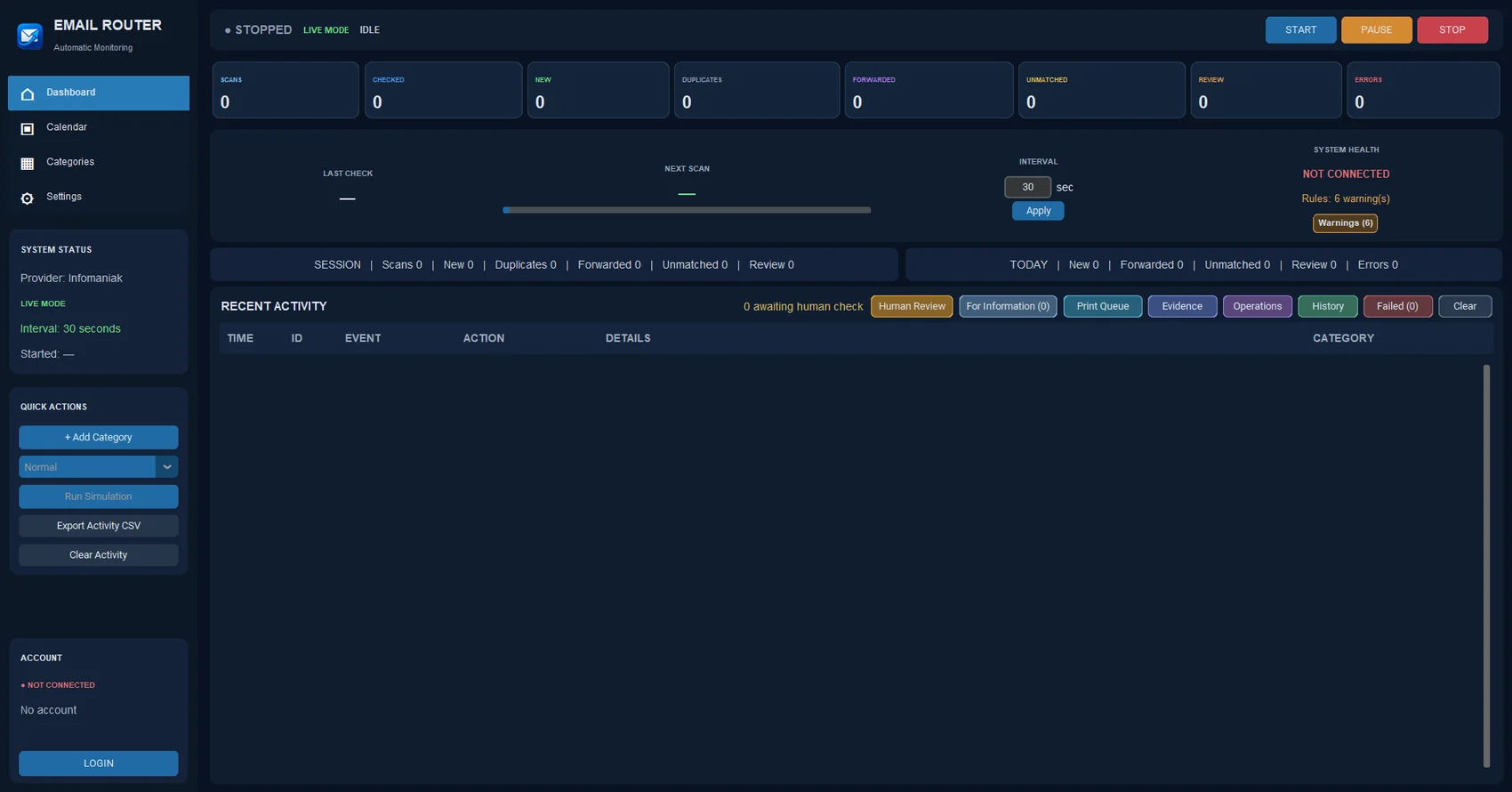
Email Router application interface
AVAILABLE NOWEmail RouterActual application interface

Contacts

AllMy ContactsRecent
D1
DiplomaticOneInstitutional Office Profile
Geneva
★
AO
Alex MorganPermanent Mission
Multilateral Affairs
☆
NS
Nadia SilvaInternational Organization
External Relations
☆
MR
Marco RossiConsulate General
Protocol
☆

Contact details

D1

DiplomaticOne

Institutional Office ProfileDiplomaticOne Demonstration Office • Geneva
Email addressescontact@diplomaticone.example
Mission RoleOffice Profile
OrganizationDiplomaticOne Demonstration Office
CountrySwitzerland
Office / Mission AddressGeneva
AreasMultilateral Affairs · Protocol
AllInteractionsPending MattersNotesRelated Contacts
Recent interactionsMeeting follow-up · 4 days ago
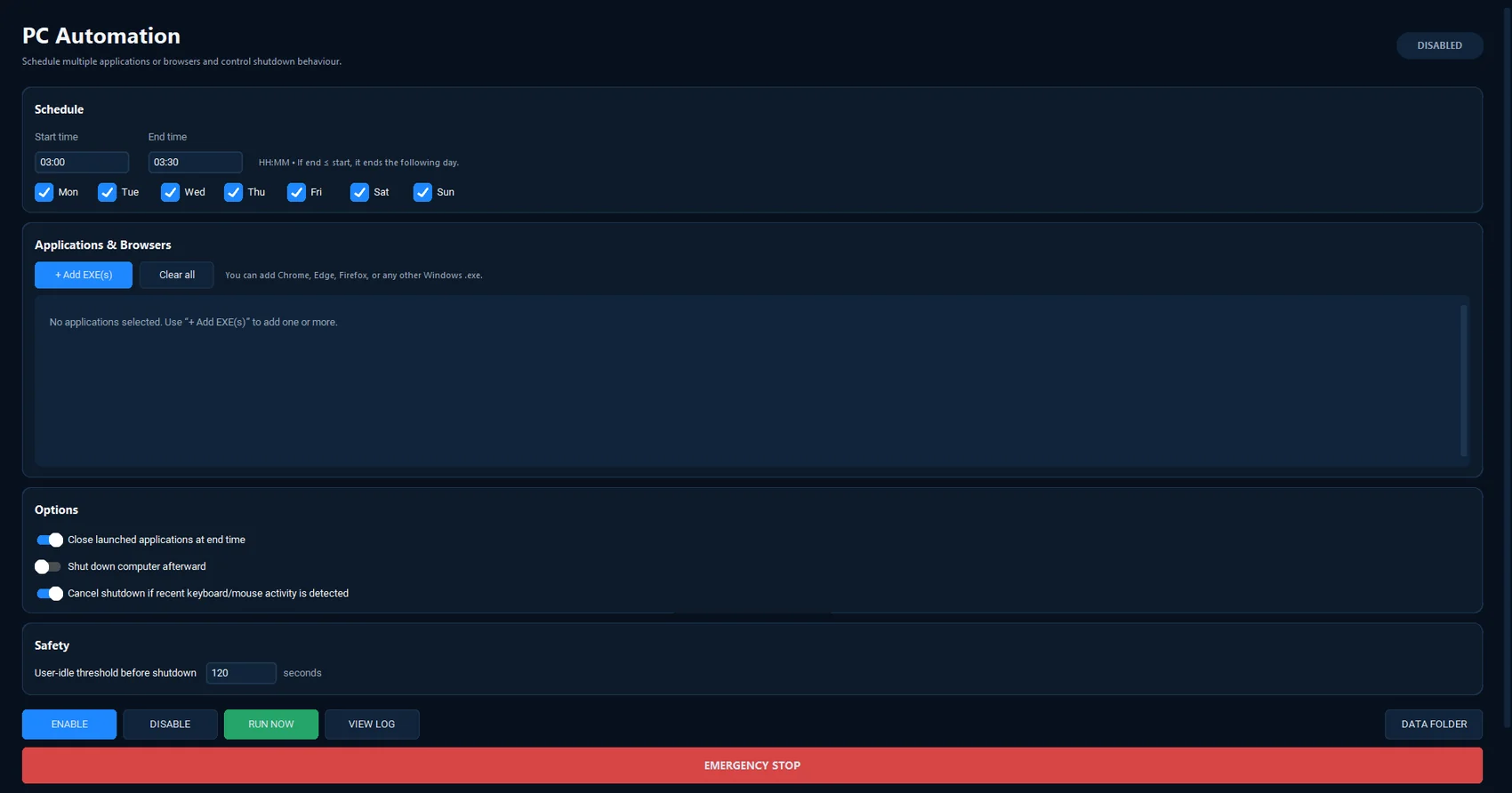
PC Automation application interface
AVAILABLE NOWPC AutomationScheduled workstation automation

Redline Checker

Compare negotiating text against recorded national positions.

2 potential issues
Draft resolution — working text

13. States are encouraged to continue cooperation and exchange relevant information...

14. States shall undertake legally binding commitments in accordance with...

15. The Secretariat is requested to report on implementation at the next session...

16. Participating States should establish a permanent reporting mechanism...

Potential red line

“legally binding commitments” may conflict with recorded position language.

View source position →
Review wording

Previous approved language uses “voluntary reporting mechanism”.

Compare wording →
More than software.
A connected diplomatic office.
ONE OFFICE. ONE CONNECTED SYSTEM.

Diplomatic work is already digital. The problem is that the knowledge is scattered.

DiplomaticOne assists staff around the tools an office already uses, automatically connecting information that would otherwise remain divided between inboxes, documents, contacts, cables and individual memory.

01

Communications

Automatically turn incoming correspondence into organized, visible work while keeping human control over sensitive decisions.

Email routingHuman reviewCalendar extraction
ConnectsEmail Router → Contacts → Deadlines
02

Relationships

Intelligently preserve who people are, how the office knows them and what remains pending beyond staff rotations.

ContactsOrganizationsInteractions
PreservesInstitutional relationship memory
03

Intelligence

Assist staff by surfacing deadlines, red lines, briefing context and issues that require attention before they become urgent.

Red linesBriefingsDeadlines
SurfacesWhat matters next
AVAILABLE NOW

Start with practical tools that solve daily office problems.

Each application can work independently. Their value increases as they share institutional information.

AVAILABLE

Email Router

Turn incoming correspondence into organized, visible work.

Classify incoming mail, apply mission-defined routing rules, send authorized forwards and keep uncertain decisions in Human Review. The office remains in control while repetitive inbox handling becomes consistent.

  • Mission-defined categories and routing rules
  • Human Review for uncertain decisions
  • Secure support for multiple connected mailboxes
  • Calendar and event extraction from incoming messages
  • Automatic interaction history with Mission Contacts
  • Clear activity history for operator visibility
Mission Contacts
ContactsOrganizationsSuggestionsSettings
Contacts
D1DiplomaticOneInstitutional Office Profile
AMAlex MorganPermanent Mission
NSNadia SilvaInternational Organization
Contact detailsDemo data only
D1

DiplomaticOne

Institutional Office ProfileDiplomaticOne Demonstration Office • Geneva
Emailcontact@diplomaticone.example
RoleOffice Profile
OrganizationDiplomaticOne Demonstration Office
AreasMultilateral Affairs · Protocol
AllInteractionsPending MattersNotes
AUTO-LINKEDInstitutional history stays connectedEmail Router can add interactions automatically while staff remain in control.
AVAILABLE

Mission Contacts

Keep institutional relationships and context together.

Centralize people and organizations so contact knowledge, interaction history and institutional context remain useful across portfolios and staff rotations.

  • Centralized people and organizations
  • Multiple emails, phone numbers and roles
  • Related contacts and institutional context
  • Automatic interaction history from Email Router
  • Contact-update suggestions while staff stay in control
  • Institutional knowledge that survives staff rotations
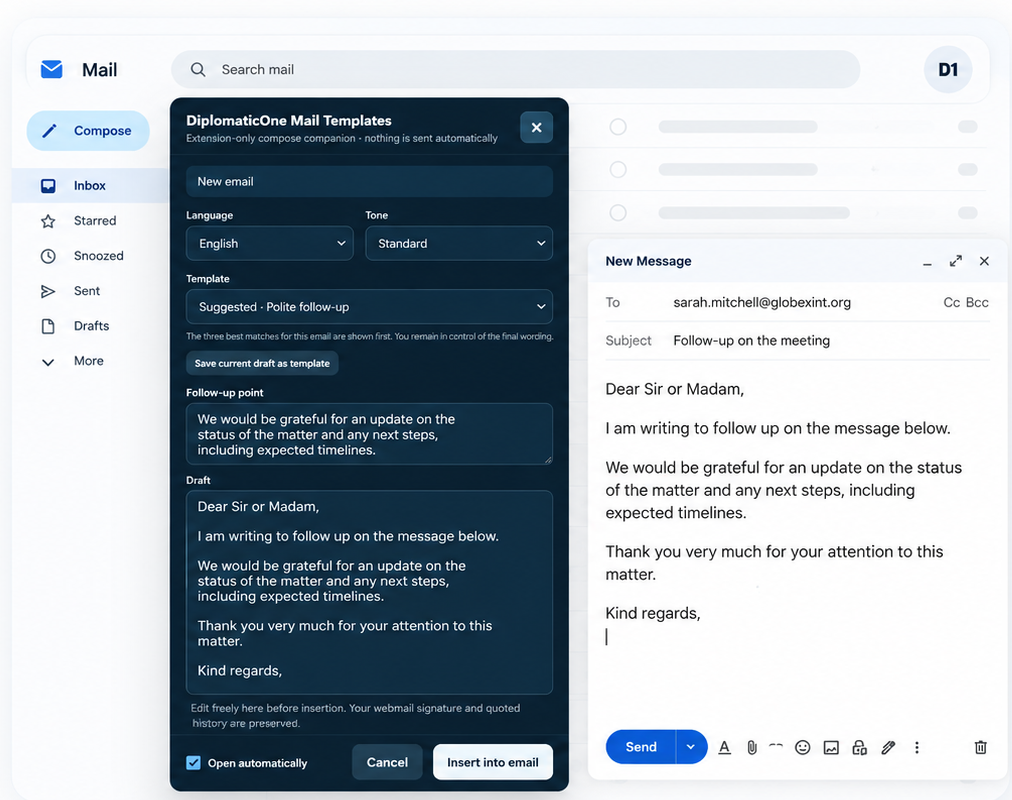
DiplomaticOne Mail Templates extension beside a generic webmail compose window showing the follow-up point inserted into the finished draft
AVAILABLE

Mail Templates

Write professional diplomatic correspondence faster.

Create and insert ready-to-use templates directly in your email while keeping full control of the final wording. Your follow-up point is integrated into the middle of the selected draft, saving time while preserving a consistent diplomatic style.

  • Gmail / Google Workspace, Outlook Web, Yahoo Mail, Proton Mail, Fastmail and Zoho Mail
  • Reusable templates for common diplomatic situations
  • Custom follow-up point automatically integrated into the draft
  • Multiple languages, tones and editable wording
  • Save and reuse your own templates
  • Preserves your webmail signature and quoted history
  • Nothing is sent automatically
AVAILABLE

PC Automation

Schedule once. Run consistently.

Automate recurring workstation routines by launching the applications and browser workflows you choose, then closing them cleanly at the configured end time.

  • Day-by-day start and end schedules
  • Launch selected applications and browser workflows
  • Close launched applications at the end of the run
  • Activity-aware protection before unattended shutdown
  • Detailed run, shutdown and verification logging
  • Designed for reliable unattended workstation routines
PC AutomationScheduled workstation workflow
AUTOMATION READY
7 daysSchedule active2 appsLaunch sequenceSafetyActivity-aware
START03:00
END03:30
MTWTFSS
Applications & Browsers+ Add EXE(s)
01Browser / office applicationScheduled
02Reporting workflowScheduled
Close launched applications at end time Cancel shutdown on recent user activity
AUTOMATICSchedule once. Run consistently.Designed from the actual PC Automation workflow.
DIPLOMATICONE ROADMAP

Built around the workflows ordinary office software does not understand.

Products are labeled clearly as available, planned or in development so their current status is always visible.

IN DEVELOPMENT

Redline Checker

Upload negotiating text, PDFs or Word files and identify wording that may conflict with recorded national positions or approved language.

AVAILABLE

Mail Templates

Reusable diplomatic correspondence with variables, languages and fast handoff to webmail.

PLANNED

Candidature Tracker

Track international elections, support requests, voting commitments and reciprocal arrangements.

PLANNED

Briefing Builder

Generate meeting packs using institutional contacts, recent interactions, pending matters and previous notes.

PLANNED

Handover Manager

Preserve files, key contacts, positions, pending matters and practical knowledge when an officer leaves.

PLANNED

Officer Onboarding

Help incoming diplomats understand their portfolio, people, deadlines and institutional history faster.

PLANNED

Relationship Radar

See which diplomatic relationships are active, quiet or require attention without reducing them to a crude score.

PLANNED

Deadline Radar

Turn correspondence and office information into visible, assignable institutional deadlines.

PLANNED

Mission Hub

The central DiplomaticOne application connecting urgent items, products, contacts, deadlines and institutional intelligence in one place.

MORE THAN SOFTWARE

Configured for the office.
Maintained as a service.

DiplomaticOne combines automation with human assistance. We customize each deployment around the office's actual users, categories, routing rules and routines — then keep the tools useful as staff, priorities and workflows change.

01

Install

Deploy the selected DiplomaticOne products and prepare the local environment.

Initial deployment
02

Configure

Adapt users, categories, routing rules and workflows to the way the office actually works.

Office-specific setup
03

Train

Give staff a focused introduction so the tools become useful from the first day.

Practical onboarding
04

Maintain

Handle updates, troubleshooting, small configuration changes and routine support.

Ongoing service
05

Improve

Introduce supported capabilities over time as DiplomaticOne and the office evolve.

Continuous improvement
SIMPLE, TRANSPARENT PRICING

Choose the right level for your mission.

Each package combines a one-time implementation with an ongoing managed service. The selected tools are configured to fit the way your office actually works rather than forcing a standard template.

How billing works: the implementation fee is paid once at setup and is in addition to the monthly managed-service fee.
15-minute demonstration • No commitment • NDA-backed confidentiality • Tailored to your office
ESSENTIAL

DiplomaticOne Email

Automatic email workflow with the essential managed support around it.

CHF 800paid once at implementation • additional to monthly service
CHF 350/ month managed service
  • Email Router
  • Office-specific initial configuration
  • Routing categories & rules
  • Updates & managed support
Contact us
BEST VALUE COMPLETE

DiplomaticOne Complete

The broader DiplomaticOne environment for offices that want the most automation and support.

CHF 1,500paid once at implementation • additional to monthly service
CHF 700/ month managed service
  • Everything in Professional
  • PC Automation
  • Cross-module workflow setup
  • Additional supported modules
  • Advanced configuration
  • Expanded workflow assistance
  • Priority support
  • Ongoing optimization
  • New supported capabilities as available
Contact us
SEE IT BEFORE YOU CHOOSE A short demonstration is the simplest way to see which level fits your office. 15 minutes • No commitment • Tailored to your mission or international office
SECURITY & CONTROL

Your mission's information remains your mission's information.

DiplomaticOne is being designed around local control, configurable workflows and human oversight. Every business engagement is covered by a confidentiality agreement (NDA). The objective is simple: useful automation without turning institutional information into a black box.

Designed for sensitive office environmentsOperational content processed by DiplomaticOne remains under the office's control. DiplomaticOne does not receive, retain or gain access to that content merely because it passes through the software. Any exceptional support access requires the office's explicit authorization and is limited to the agreed purpose and scope.
Local-first controlKeep operational information under office control and minimize unnecessary external exposure.
01
Human oversightAutomation supports decisions. Uncertain or sensitive items remain visible for review.
02
Mission-configuredUsers, categories, rules and workflows are adapted to each office instead of forcing one template.
03
Managed supportConfiguration, maintenance, updates and troubleshooting remain part of the service.
04
WHAT DIPLOMATICONE DOES

DiplomaticOne assists diplomatic offices with routine digital workflow while keeping staff in control.

DiplomaticOne is a suite of desktop and browser-based office tools for diplomatic missions, embassies and international offices. Its available products include Email Router, Mission Contacts and PC Automation. Email Router connects only to mailboxes that an authorized user chooses to connect, then helps classify incoming correspondence, apply office-defined routing rules, surface uncertain messages for Human Review, extract calendar information and send authorized forwards.

SEE IT IN YOUR WORKFLOW

Spend less time managing the office. Spend more time doing diplomacy.

See how DiplomaticOne can be configured around the actual workflow of a diplomatic mission or international office.

CONTACT DIPLOMATICONE

Tell us what your office needs.

Ask a question, discuss procurement, or request a 15-minute demonstration. Tell us what your office needs and we will respond directly with an approach tailored to your workflow.

Check the frequently asked questions →
CONTACT FORM

How can we help?

Usually answered directly
What can we help with? * Choose the closest option. You can add any detail in your message.
FREQUENTLY ASKED QUESTIONS

Useful answers before you contact us.

Most offices can answer the main practical questions here. If your situation is different, the contact form remains the fastest way to reach us directly.

Is the 15-minute demonstration free and without commitment?

Yes. The demonstration is a short, no-commitment walkthrough designed to show how DiplomaticOne could fit your office's workflow. Requesting a demo or proposal does not create a purchase obligation.

Is our information protected by a confidentiality agreement?

Yes. DiplomaticOne business engagements are covered by a confidentiality agreement (NDA). DiplomaticOne does not take ownership of, receive, retain or gain routine access to the operational information that passes through the programs. The software is designed so that this information remains under the mission or office's control. If exceptional technical support ever requires access to specific information, it is only with the office's explicit authorization, for the agreed purpose and scope, and subject to the confidentiality agreement.

Is DiplomaticOne customized for each mission or office?

Yes. DiplomaticOne is not deployed as a one-size-fits-all template. We configure the selected products around the office's users, responsibilities, categories, routing rules, schedules and practical workflow needs.

Do we need to replace the systems we already use?

No. DiplomaticOne is designed to work around the systems an office already uses. The objective is to connect repetitive work, institutional information and office processes without forcing a mission to replace its existing tools.

How are mission email accounts connected securely?

Email Router follows the authentication method supported by each provider. Microsoft 365 and Google Workspace can use provider authorization, while services such as Infomaniak may require a one-time device credential for external mail applications. This does not require changing the office's normal webmail password. Connection details are configured for the office during implementation.

What does the Implementation & Configuration Fee cover?

It covers the initial deployment and office-specific setup of the selected DiplomaticOne products, including configuration and practical onboarding. It is a one-time fee and is separate from the monthly managed-service charge.

What is included in the monthly managed service?

The managed service keeps the deployment useful after installation through supported maintenance, updates, troubleshooting, routine configuration changes and ongoing optimization within the agreed scope.

What happens when staff, responsibilities or workflows change?

That is one of the reasons DiplomaticOne is offered as a managed service. Supported configuration can be adjusted as users, responsibilities and office routines evolve, while preserving continuity and institutional knowledge.

What are the cancellation terms?

The managed service has an initial minimum service period of two months. After that, it continues month to month and may be cancelled with 30 days’ written notice. The Implementation & Configuration Fee is a separate one-time charge and, once implementation work has begun, is not refundable. The 15-minute demonstration and tailored proposal remain completely without commitment, and the proposal sets out the applicable transition and service-end arrangements before any paid work starts.

Still have a question? Contact DiplomaticOne →